




Prism: A New AI LaTeX Editor for Academic Writing

As an engineering librarian, one common question I get from students and faculty is: does HKUST have an Overleaf subscription? Unfortunately, we don't. But now there is a compelling free alternative worth trying — Prism, an AI-native LaTeX editor rolled out by OpenAI in January 2026.
Powered by GPT-5.2, Prism integrates AI directly into the LaTeX editing workflow, so you no longer need to copy-paste between a chatbot and your editor. Think of it as something similar to Copilot in MS Word or Notion AI in Notion, but built specifically for scientific writing in LaTeX. The underlying technology is not groundbreaking, but the practical benefits for LaTeX users are significant.
For those currently on Overleaf’s free tier — which limits real-time collaboration and restricts AI features to daily quotas — Prism offers a major upgrade: unlimited projects, unlimited collaborators, unlimited compile time, and free AI features. Anyone with a ChatGPT account can sign up and start writing immediately. OpenAI has noted that more powerful AI features may be available through paid ChatGPT plans in the future, but for now, everything is free. One hurdle for Hong Kong users: accessing Prism currently requires a VPN.
Getting Started with Prism
To get started, create a free account at prism.openai.com. You can sign in using your OpenAI, Google, or GitHub account. Once logged in, you have two options for starting a project.
a. Start from scratch
If you are writing a new paper, go for “+ New”. Prism will load a simple template, similar to what you would see when creating a new project in Overleaf or any other LaTeX editor.
The key difference is the ChatGPT chatbox at the bottom of the screen. You can ask AI to help with tasks like checking figures and tables, fixing references, proofreading your writing, or even converting diagrams and equations into LaTeX. Because the AI has access to your full document context (including surrounding text, equations, citations, figures, and overall structure), its suggestions tend to be more relevant than what you would get from a standalone chatbot.
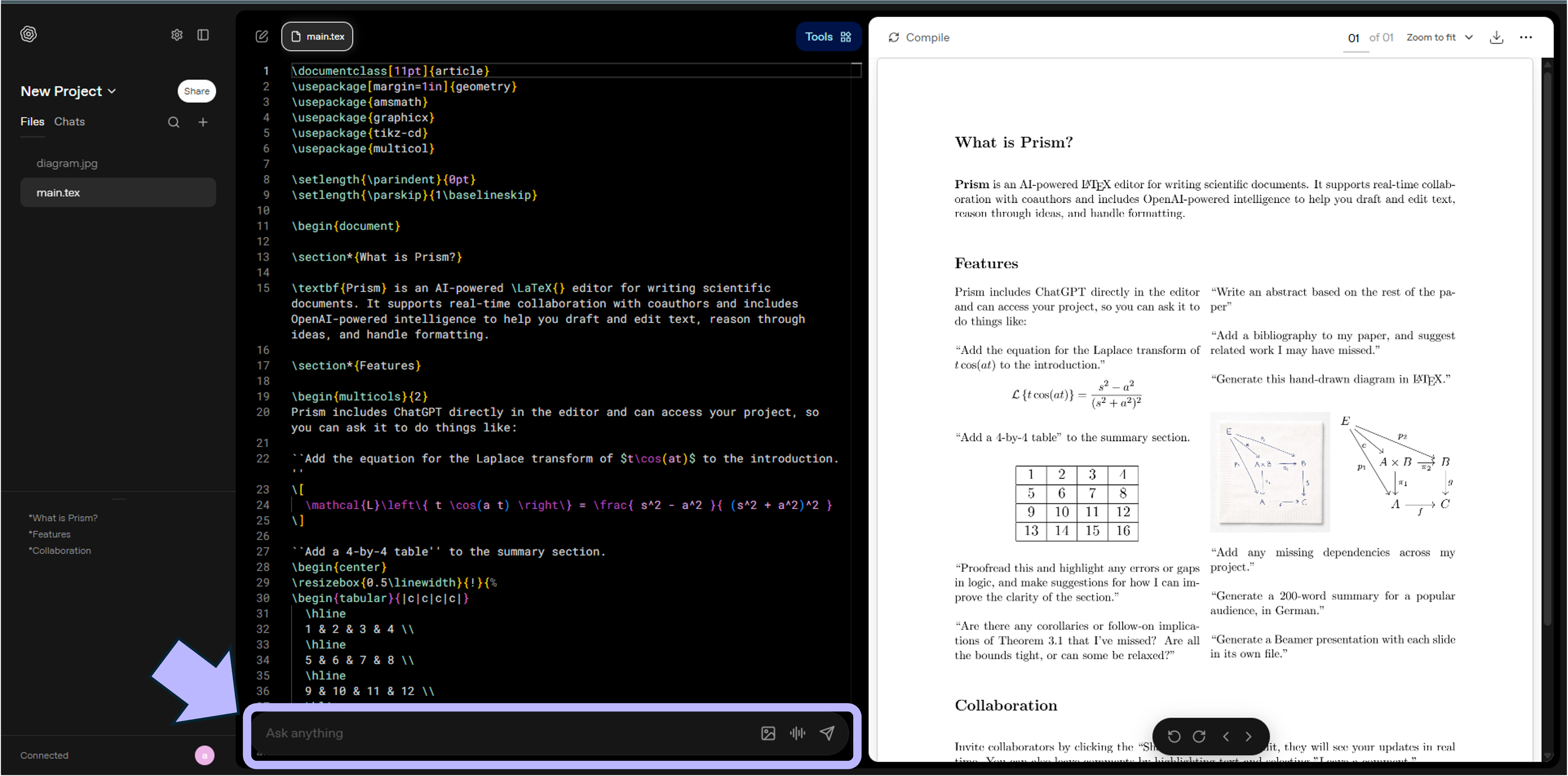
Fig.1. Create a new project in Prism and load the template
b. Import an existing project
If you already have a paper in progress, a more common scenario would be to import your existing project. Simply export your project from your LaTeX editor as a .zip file and upload it to Prism.
Here’s an example of a project I imported from Overleaf. After importing, it’s common to encounter some errors — you may notice the alerts under “Tools” in the top-right corner, or missing figures in the compiled PDF. Don’t worry, Prism’s AI can fix these quickly.
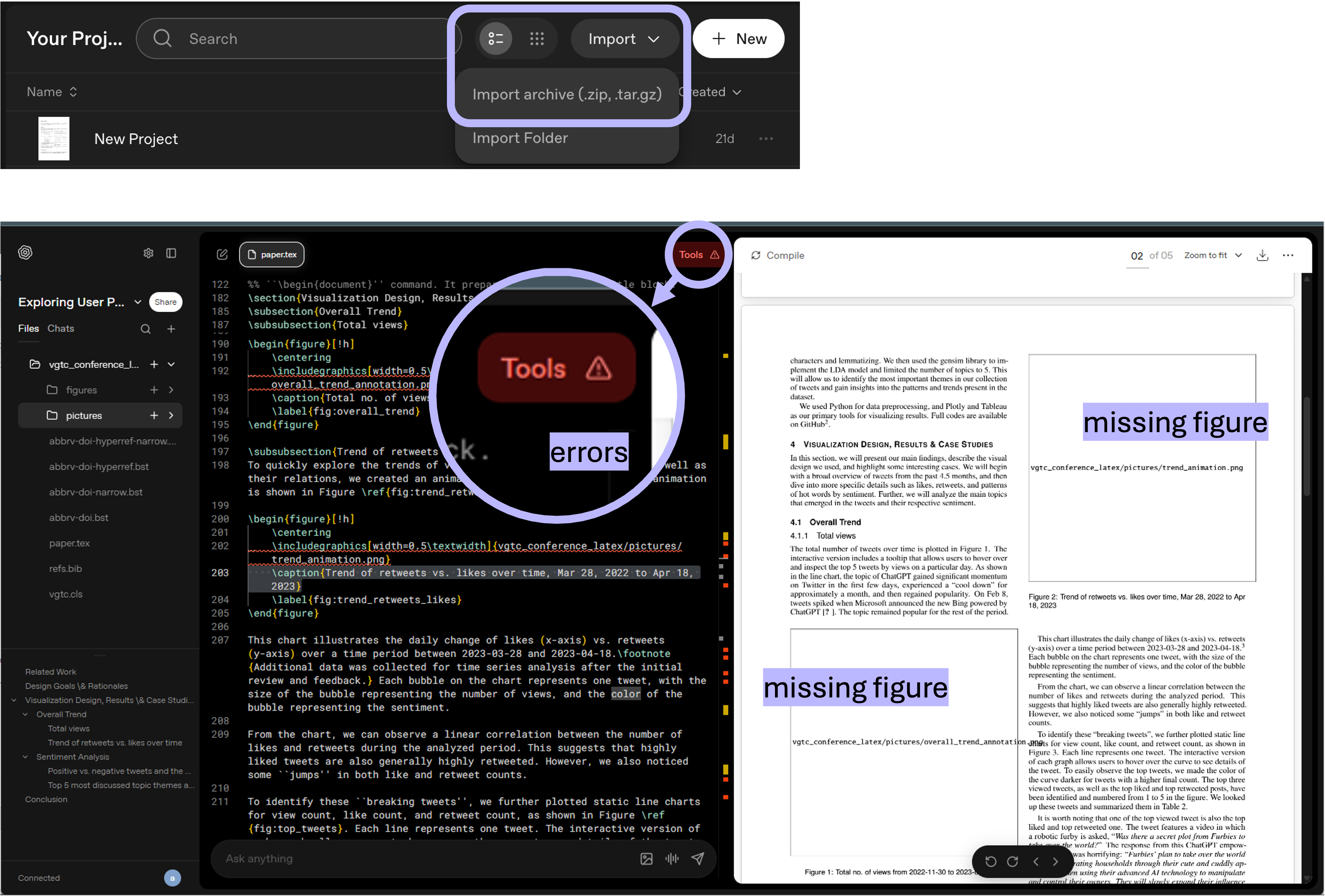
Fig.2. Import a LaTeX .zip project into Prism
Let’s now walk through some of Prism’s key features and see how it can resolve these issues.
Debug and Proofread
One of Prism’s most useful day-to-day features is its ability to detect and fix errors across your document. After importing a project, check the “Tools” alert messages, then click “Fix with AI” to check the errors one by one. The click will prompt AI directly based on the context of the issue and try to fix it.
Here are a few examples.
Use Case 1. Fix missing figures
After importing a project, Prism identified the missing figures in the compiled PDF — a common issue in LaTeX editing. Click "Fix with AI" and the problem is resolved within seconds.
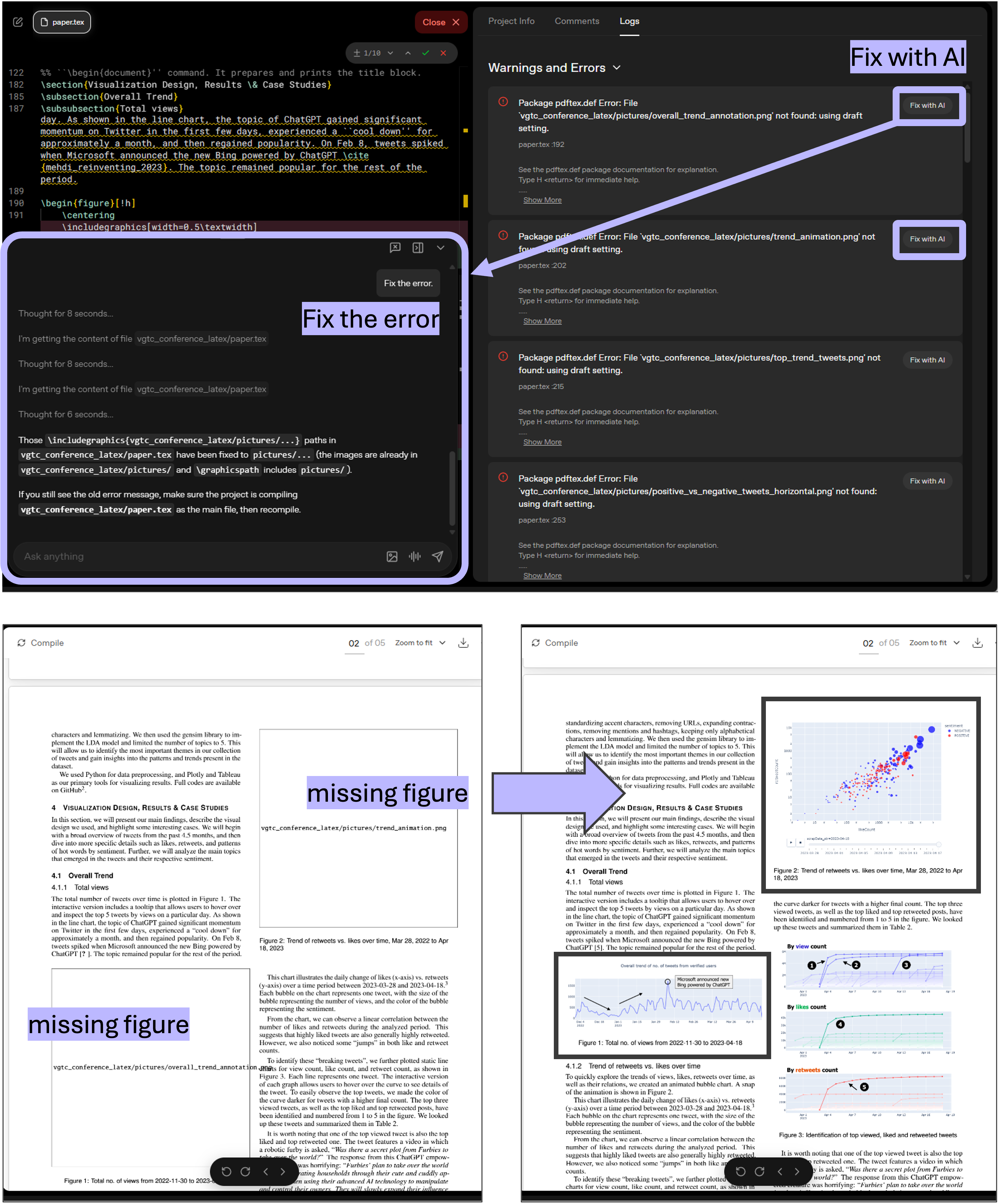
Fig.3. Fix errors with AI (e.g. missing figures)
Use Case 2. Check references and fix typos
Prism can also scan your references for errors, inconsistencies, and typos. Most important, whenever it detects an issue and proposes a change, it will always ask you to confirm before applying — you can choose to Keep or Undo each suggestion. This human-in-the-loop approach means you stay in control.
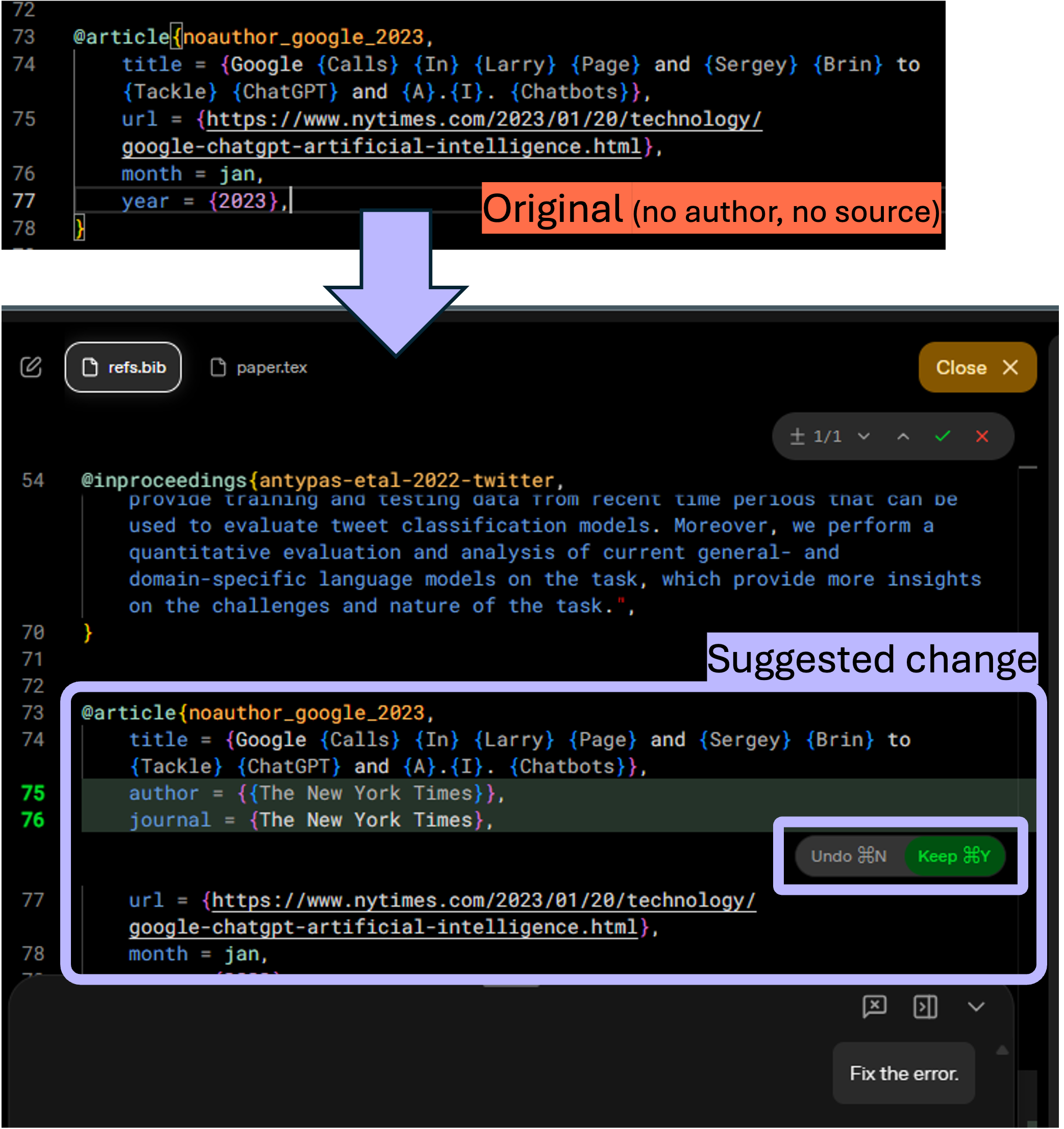
Fig.4. Check references & fix errors
Use Case 3. Proofread your writing
Prism can proofread your prose with the full document as context. It considers surrounding text, equations, citations, figures, and overall structure when suggesting improvements — so its edits are more contextually aware than a generic grammar checker. Again, every suggestion requires your confirmation before it is applied.
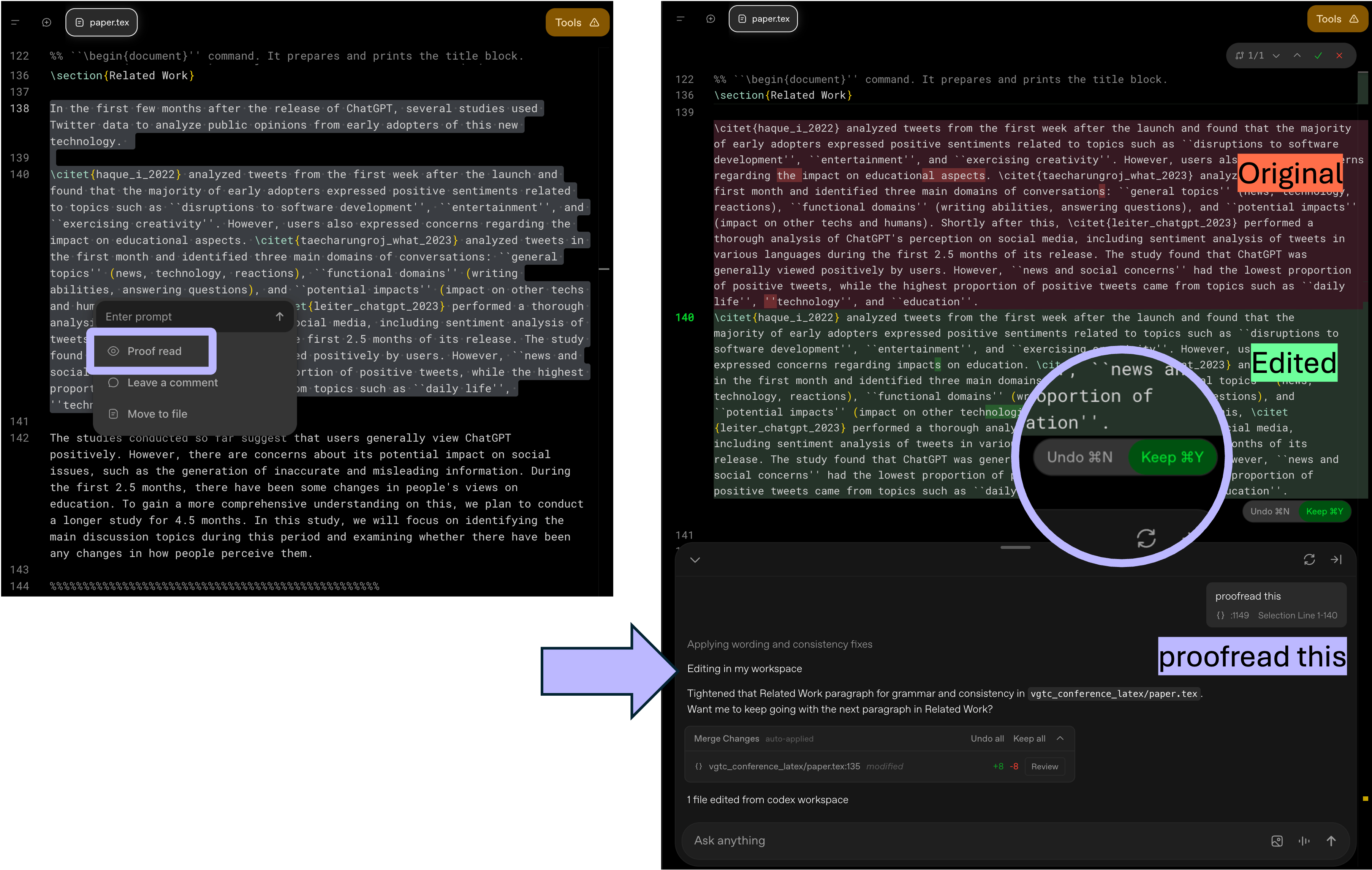
Fig.5. Proofread writing
Turn Equations and Diagrams into LaTeX
Beyond writing assistance, Prism has a few more tricks up its sleeve. Since it is powered by GPT-5.2 with vision capabilities, you can upload images of equations or diagrams and have them converted into LaTeX code automatically. This alone can save hours of time that would otherwise be spent retyping equations or manipulating graphics pixel by pixel.
Use Case 4. Convert Math equations
In this example, I uploaded a screen cap of Math equations and asked Prism to convert them into LaTeX (also asked it to place the converted equations side by side with the original image for easy comparison). Impressively, it not only converted the equations correctly but also recognized different notation styles — e.g. bold vs. arrow notation for vectors, and different multiplication signs — which are mathematically identical.
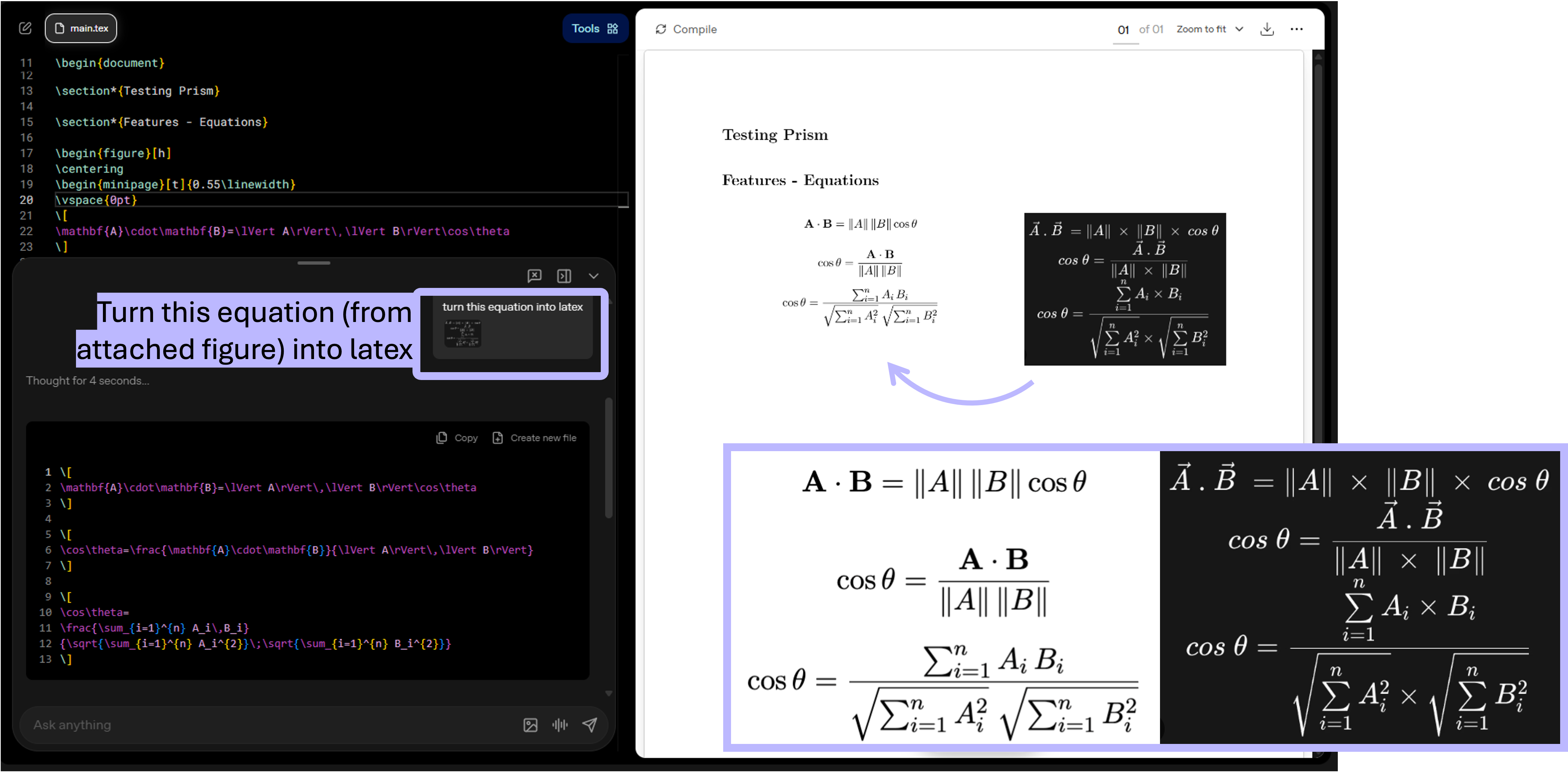
Fig.6. Convert Math equations into LaTeX
Use Case 5. Convert chemical equations
In another example, I uploaded an image of handwritten chemical equations and asked Prism to convert them and verify their accuracy. It recognized that the equations were unbalanced and corrected them accordingly — a nice demonstration of how AI can both generate and verify scientific content.
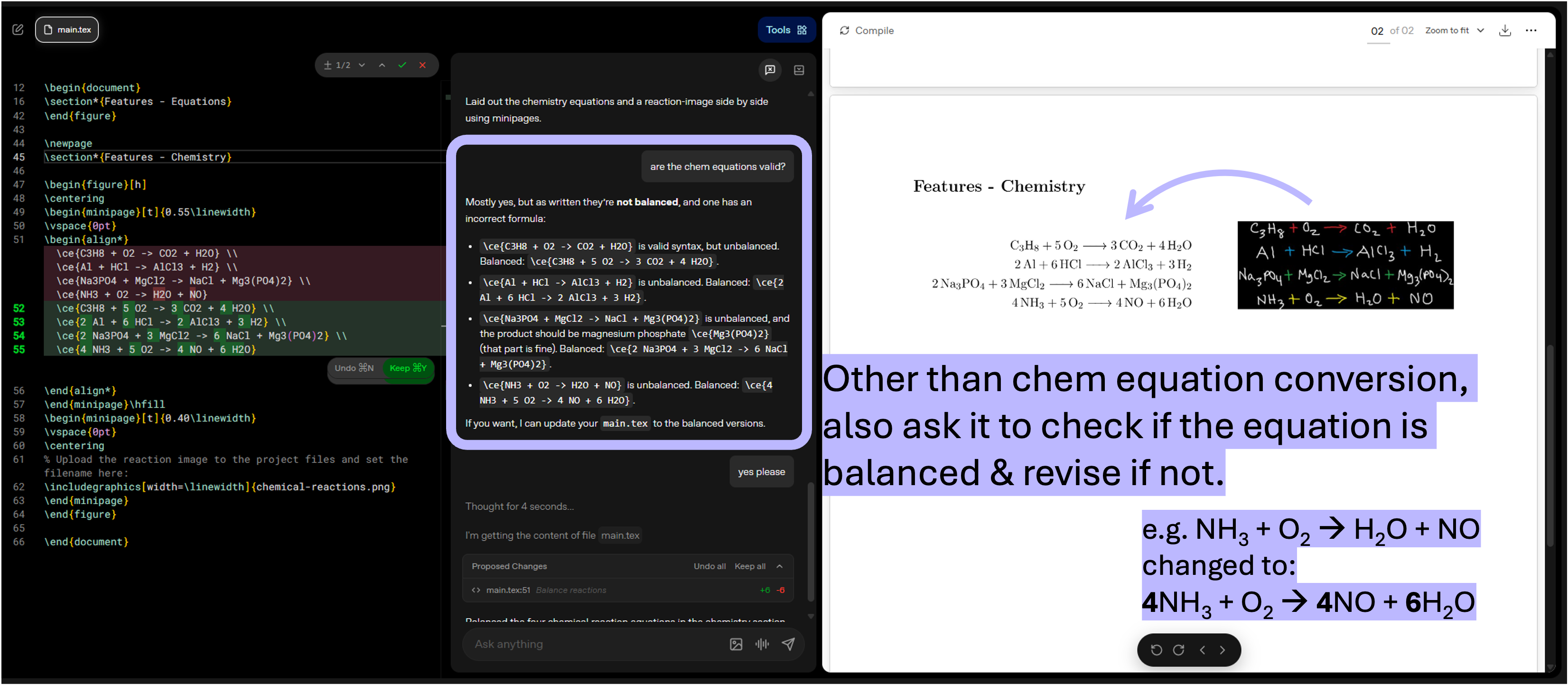
Fig.7. Convert chemical equations into LaTeX and check if balanced
Search Literature with Agent
Beyond fixing and converting content, Prism has just included a new feature Agent — a more autonomous AI capability that can carry out multi-step research tasks on your behalf. While the chatbox handles quick, single-turn requests, the Agent can independently search for relevant literature, cross-check your existing citations, and update your project files — all with your approval before any changes are applied. You can also create multiple Agents for different tasks and run them simultaneously.
Use Case 6. Find and cite relevant literature
In this example, I started a new Agent to identify relevant papers I should consider citing. The Agent searched the literature and returned a curated list organized by topic and relevance — primarily open access papers and preprints from arXiv. When I asked it to include source links or DOIs and flag which papers were already cited in my document, it identified five additional relevant articles, all with correct links and DOIs.
The Agent proceeded step by step, suggesting actions such as adding BibTeX entries to refs.bib and inserting the corresponding citations into paper.tex. Importantly, Prism presented every proposed change for my review and only applied updates after I confirmed. The BibTeX entries it added were all accurate. That said, the claims it inserted into Related Work section was quite thin — just two sentences briefly summarizing all five articles.
Overall, the Agent can be a useful supplementary tool for spotting missing citations among OA literature, but it should not be relied on as a primary tool for literature searching or literature review writing.
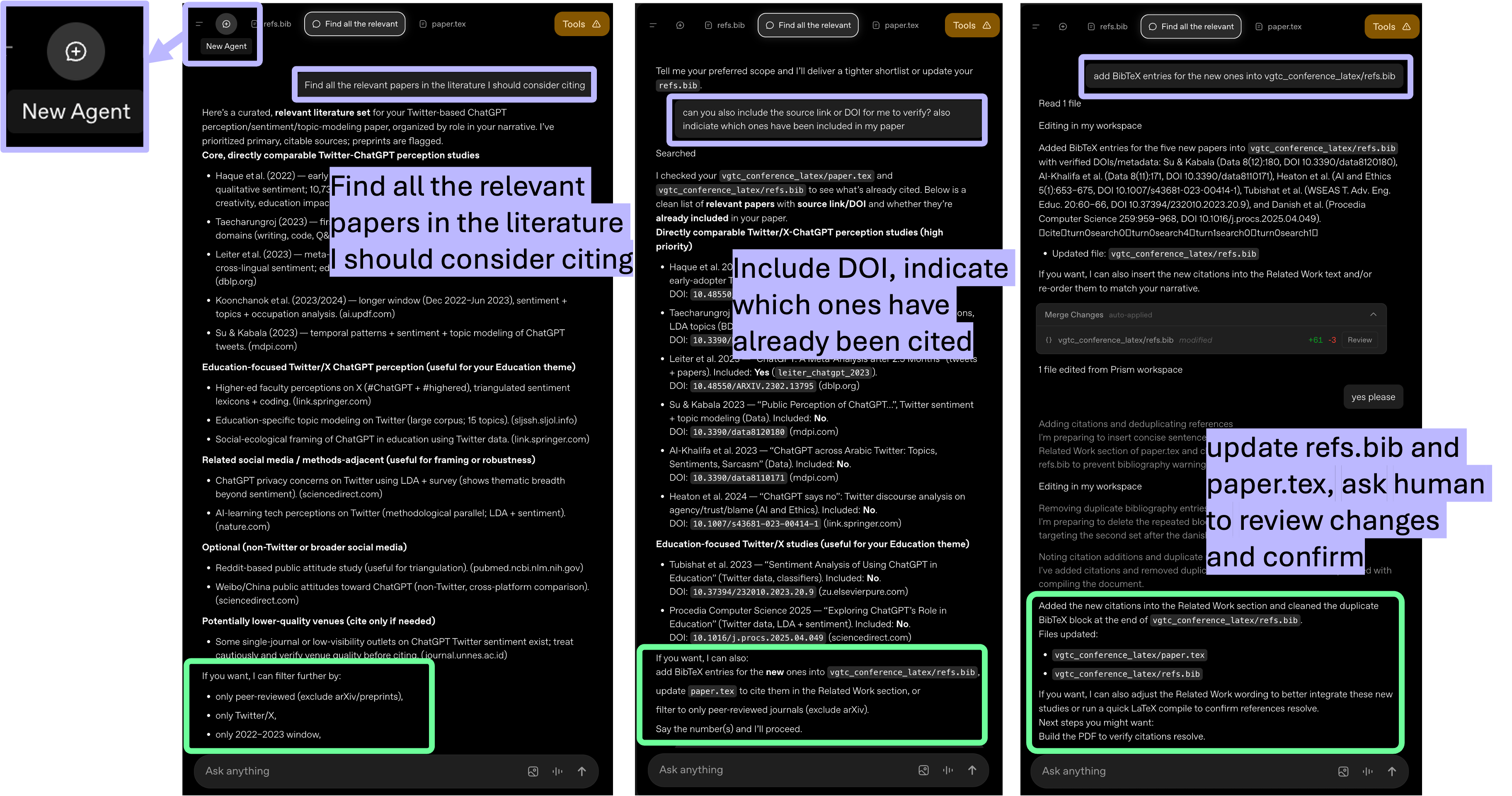
Fig.8. Agent to search literature and update paper content and bibliography
Collaborate in Real Time
One final feature worth highlighting: You can share your project with unlimited collaborators for real-time co-editing — a feature that Overleaf's free plan restricts to just one additional person. You also control permissions, deciding who can edit and who can only view your project.
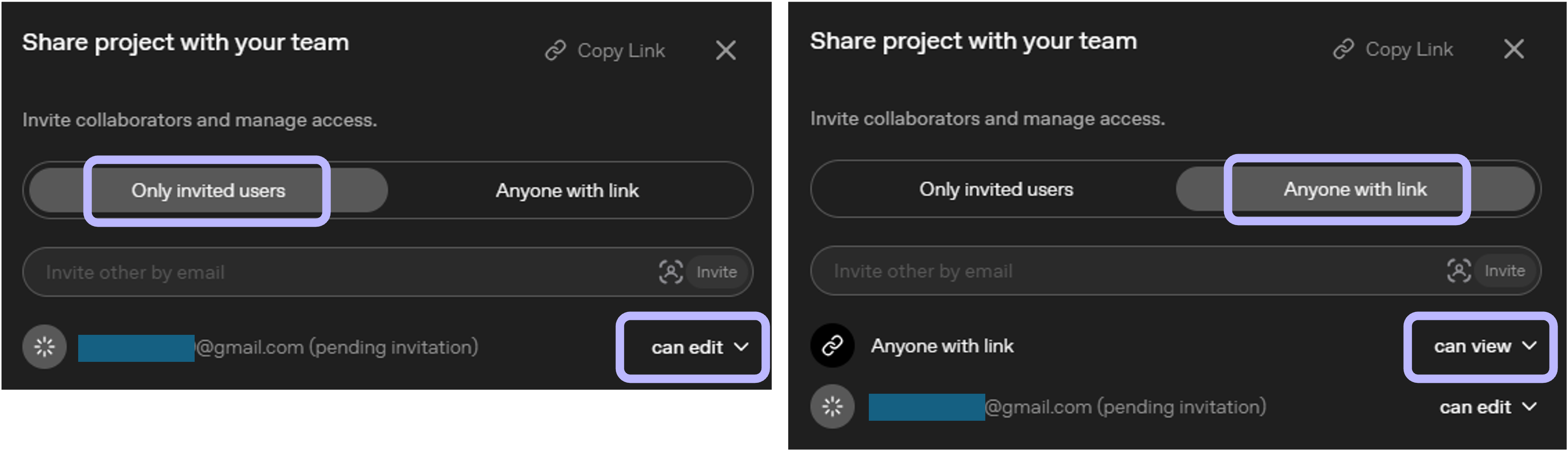
Fig.9. Share project with collaborators & control access right
Final Thoughts
Prism is not going to write your paper for you — and it should not. But as a free, browser-based LaTeX workspace with built-in AI assistance and unlimited collaboration, it lowers the barrier for researchers who need a modern writing environment without additional cost.
Here is a quick summary of what Prism offers (vs. Overleaf):
| Feature | Prism (Free) | Overleaf (Free Tier) |
|---|---|---|
| Collaborators | Unlimited | 1 additional person |
| Compile time | Unlimited | Limited |
| AI features | Unlimited (GPT-5.2) | Daily quota |
| Literature search and citations | Built-in | Not included |
| Image-to-LaTeX conversion | Yes | No |
| Local installation required | No (browser-based) | No (browser-based) |
| VPN required (Hong Kong) | Yes | No |
If you have been looking for a free, full-featured LaTeX editor with real-time collaboration and AI support, Prism is well worth a try. However, a few things to keep in mind:
- Verify AI outputs: As with any AI tool, always review and verify AI-generated content — especially references, citations, and scientific claims. The human-in-the-loop confirmation prompts are helpful, but the final responsibility rests with you.
- Pricing may change: OpenAI has stated that Prism is free for now, with more powerful features potentially available through paid plans in the future. It is worth keeping an eye on any updates.
- Data privacy: Since Prism is a cloud-based tool operated by OpenAI, be mindful of what data you upload, particularly if your research involves sensitive or unpublished material.
Disclaimer: This post was edited with the help of Claude Opus 4.6, Gemini Pro 3 and Notion AI.

