




Connect Your AI Tools to Trusted Scholarly Resources: Introducing Scite & Consensus MCP

As AI agents become part of everyday research workflows, the Library has noticed a recurring issue: several HKUST user accounts have been temporarily blocked by publishers due to excessive, automated PDF downloads.
When an AI agent downloads dozens or hundreds of full-text papers directly from publisher platforms, it often triggers automated anti-bot systems. We understand the research need: you want your AI tool to read the literature and answer complex questions. However, there is a safer, authorized approach: the Model Context Protocol (MCP).
Through MCP, AI clients such as Claude and ChatGPT connect directly to scholarly databases. Your model searches indexed literature and retrieves only the necessary passages and citations. This can reduce the need for bulk PDF scraping and keeps your research well within authorized platform limits.
In this post, we introduce two Library-subscribed AI research tools that offer MCP integration: Scite and Consensus.
What are Scite and Consensus?
Scite and Consensus are AI-driven literature discovery tools designed to search peer-reviewed literature, answer specific research questions, and synthesize findings. The Library subscribes to both services, so HKUST students and staff can use their full features, including MCP connections. When you first use either service, make sure you sign up with your HKUST email address.
What content do they search?
Both tools search hundreds of millions of peer-reviewed articles and preprints, including licensed full-text content through publisher agreements.
The table below provides a quick comparison of their coverage:
| Scite | Consensus | |
|---|---|---|
| Public portal | https://scite.ai/ | https://consensus.app/ |
| HKUST access | Access Scite via Library | Access Consensus via Library |
| Total sources | 318M+ journal articles, books, preprints; 42M+ full-text sources [1] | 400M journal articles, preprints, conference proceedings [3] |
| Data coverage |
|
|
Because the Library subscribes to the Premium or Enterprise tiers, your searches are not limited to titles and abstracts. Your AI can also interrogate licensed full text — asking targeted questions about research methods, sample sizes, experimental results, and points raised in the discussion.
How do they find articles?
Both tools accept questions in natural language, but they search in different ways.
- Scite converts your question into a traceable Boolean search query, runs a keyword search across its literature database, and returns 10–20 highly relevant articles with a synthesized summary.
- Consensus combines keyword and semantic search, which means it looks not only for matching terms but also for articles that are conceptually related to your question. It returns up to 50 relevant results and provides a consolidated synthesis.
In both platforms, you can inspect extracts from abstracts or full text (when available) to verify the evidence before incorporating it into your work.
Connect your AI tool to Scite and Consensus
Both services connect seamlessly to leading AI environments and IDEs, including Claude / Claude Code, ChatGPT / Codex, Gemini CLI, Copilot Studio, Cursor, and VS Code.
Follow the step-by-step setup guides below to connect your AI tool:
- Scite MCP: Quick setup | MCP documentation
- Consensus MCP: Quick setup | MCP documentation
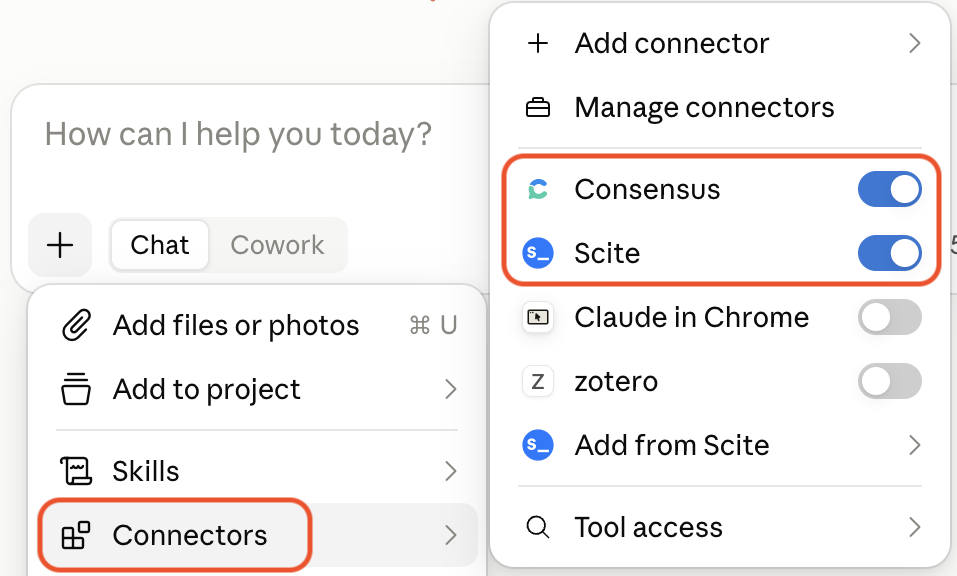
Once connected, your model can run tool calls to search literature, summarize findings, and pull grounded citations directly into your chat or workspace.
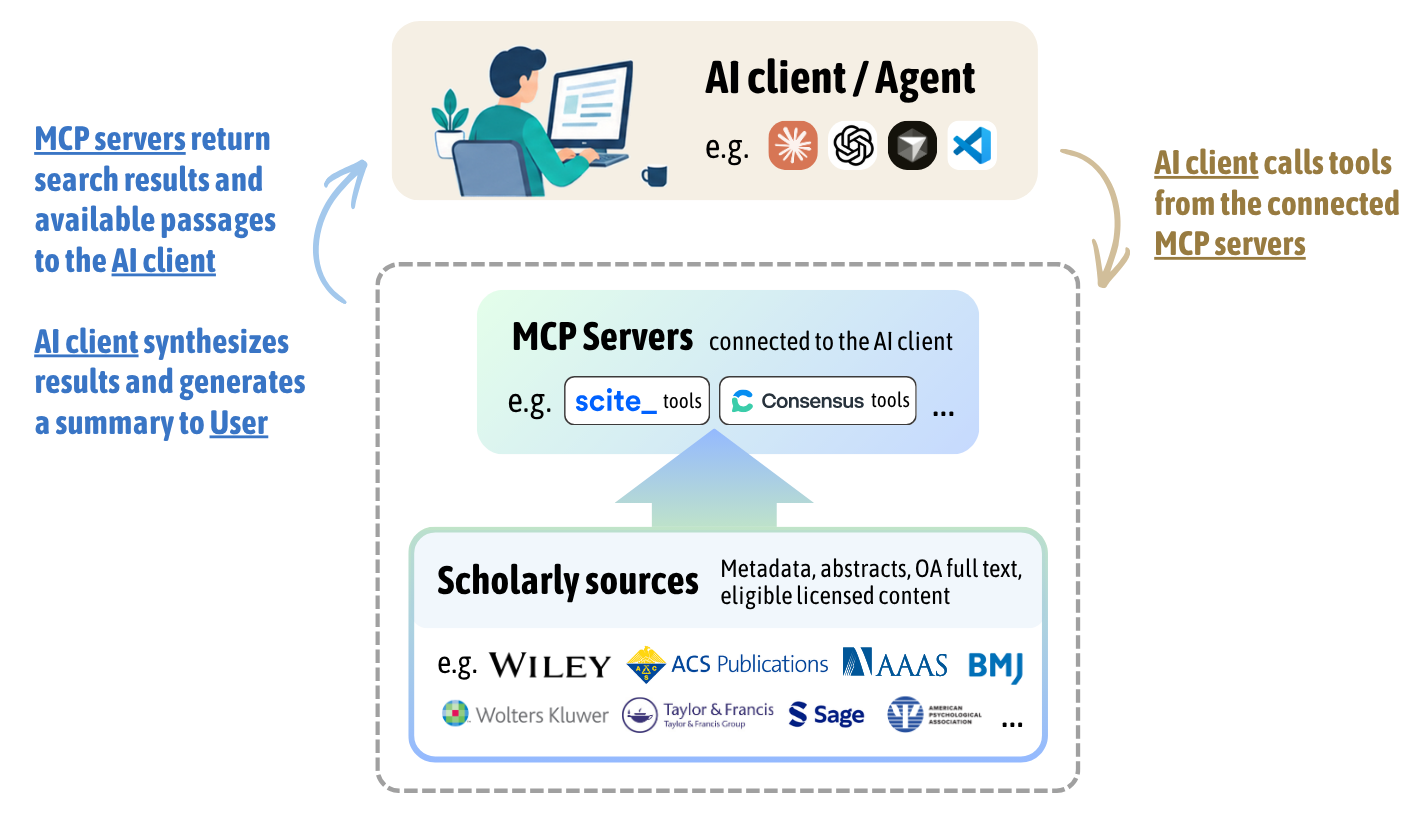
Example use case
The short demo below shows how an AI (in this case Claude) via connected MCPs retrieves relevant studies on a topic and summarizes the evidence into a CSV file.
Beyond basic discovery, Scite’s MCP also includes specialized tools. For example:
- create_collection lets you add retrieved papers to a Scite Collection and work with that set from your AI tool [5];
- citation_graph helps you explore literature from one or more seed papers, trace methods, identify subsequent critique, and follow how findings developed over time [6].
Join our workshop
Still not sure where to begin? Join our online workshop on 30 September. We will guide you through setting up MCP connections, finding papers on a topic, and building a simple research analytics dashboard.
MCP usage limits for HKUST users
The Library’s subscription plans give HKUST users significantly higher quotas than standard free accounts:
| Scite MCP | Consensus MCP | |
|---|---|---|
| About | https://scite.ai/mcp | https://consensus.app/home/mcp/ |
| MCP usage | For Premium plan: 2,500 tool calls per user per month, across all connected tools | For Enterprise tier: 500 tool calls per user per month, shared across MCP and API use |
| Supported AI clients & IDEs | • ChatGPT / Codex • Claude / Claude Code • Gemini CLI • Copilot Studio • Cursor / VS Code / Windsurf • Other MCP clients | • ChatGPT / Codex • Claude / Claude Code • Gemini CLI • Copilot M365 / Copilot Studio • Cursor / VS Code / Windsurf • Other MCP clients |
| Tools available | • search_literature • search_patents • search_clinical_trials • search_grants • create_collection • citation_graph • and more (see full list here) | • search |
| API access | Not included in the Library subscription | Included; usage deducts from the 500-call quota |
For full details, see the Scite and Consensus MCP documentation.
Early adoption at HKUST
Since Scite rolled out its MCP in March 2026, HKUST researchers have started using it even without active promotion. In about six months, 52 HKUST users tried the service, mainly through Claude, Claude Code, ChatGPT, and Codex. Together, they made close to 10,000 tool calls across 13,000 sessions. These interactions supported around 150,000 paper reads from over 83,000 unique papers (data as of 21 Sep 2026).
These figures suggest that HKUST researchers are not only experimenting with MCP, but are actively using it to discover and work with a wide range of scholarly literature.
Other MCPs for literature discovery
While Scite and Consensus are the Library’s supported platforms, they are not the only MCPs for literature work. Other options include:
Free or publicly available MCPs: PubMed; Zotero (to work with your own literature collection); Semantic Scholar; OpenAlex
Note: Some of these are community-built rather than official services. Review their documentation, privacy practices, and access limits before using them.
- Subscription services with a free tier or trial: Wiley Scholar Gateway (free tier includes 30 queries per month); Undermind (free tier has rate limits, mainly provides abstract-level access)
- Subscription only: Elicit
Native platform vs. MCP: Which should you use?
Whichever service you choose, you can search on its native platform or connect it to an AI tool through MCP. For each service, both routes search the same underlying literature collection. The best choice depends on your workflow.
Using the native platform gives you a guided workflow and platform-specific features. This may be a good option if you do not use ChatGPT or Claude, or if you want a straightforward search experience.
Using an AI tool with MCP gives you more flexibility. It is especially useful when you want to:
- combine evidence from several connected sources/MCPs;
- refine questions through multiple rounds of searching;
- move directly from literature discovery to data extraction, writing, coding, or prototyping; or
- build a repeatable research workflow.
The native platforms also offer features that may not be available through an MCP connection. For example, Consensus provides Consensus Meter (a visual indication of whether retrieved papers tend to support or challenge a claim), Study Snapshots (quick views of sample size, design, and journal metrics), Deep Search (searches a large set of papers and returns the most relevant results), and Citation Graph (explores related papers through direct citations, co-citations, and bibliographic coupling) [7]. Scite features Smart Citations (showing whether subsequent studies supported or contrasted a claim), and Reference Check (flagging retractions or editorial notices).
Key takeaways
The choice does not have to be either-or. You can use the native platforms for guided searching and MCP when you need a more flexible, connected workflow.
MCP gives you a flexible way to bring literature discovery into your existing AI workflow, while respecting publisher licenses and avoiding bulk downloading. If you already use ChatGPT, Claude, or another MCP-compatible AI tool, Scite MCP and Consensus MCP can help you search, evaluate, and organize research evidence more efficiently.
If you do not have access to those AI tools, the Scite and Consensus' native platforms remain good options for literature discovery and evidence-based research.
References
[1] Scite, “Scite Data and Services.” Accessed: Sep. 18, 2026. [Online]. Available: https://scite.ai
[2] Scite, “Scite’s coverage of the scholarly literature.” Accessed: Sep. 18, 2026. [Online]. Available: https://scite.ai/blog/2023-02-16_coverage
[3] Consensus, “What’s Changed in Consensus? (Summer ’26) — Consensus: AI for Research.” Accessed: Sep. 18, 2026. [Online]. Available: https://consensus.app/home/blog/what-has-changed-in-consensus-summer-26/
[4] Consensus, “Consensus Research Database - About our data.” Accessed: Sep. 18, 2026. [Online]. Available: https://help.consensus.app/en/articles/10055108-consensus-research-database
[5] Scite, “June 2026 Release Notes - Collections in the MCP.” Accessed: Sep. 19, 2026. [Online]. Available: https://scite.ai/blog/june-2026-release-notes
[6] Scite, “Citation Surfing with Scite MCP.” Accessed: Sep. 18, 2026. [Online]. Available: https://scite.ai/blog/citation-surfing-scite-mcp
[7] Consensus, “Citation Graph.” Accessed: Sep. 19, 2026. [Online]. Available: https://help.consensus.app/en/articles/13846077-citation-graph
