




What Your AI Remembers About You

Ask ChatGPT a quick question this morning and it may already know you work on membrane chemistry, skip the explanations you don't need, and format the answer the way you like. You told it none of this today. Yet the same afternoon, an hour into one long conversation, it loses track of a table you pasted near the start.
Both behaviors come from the same design. An AI assistant keeps track of what you tell it in two different ways, called context and memory. They follow different rules, live in different places, and are controlled from different settings. Confusing the two is one reason these tools feel unpredictable, so in this post let's take them one at a time.
Context: what the model can see right now
A conversation looks continuous on your screen, but underneath it is not. The model keeps nothing between one message and the next, even within a single chat session. Each time you press send, including for a follow-up question in a chat you have been using all morning, the app rebuilds the whole conversation so far behind the scenes: everything you have written in this chat, everything it has replied, any files you attached, plus some standing instructions. It hands that entire bundle to the model to read from the beginning. Anthropic's developer documentation describes this bundle as the model's "working memory": while writing a reply, the model can consult what is in the bundle and nothing else [1].
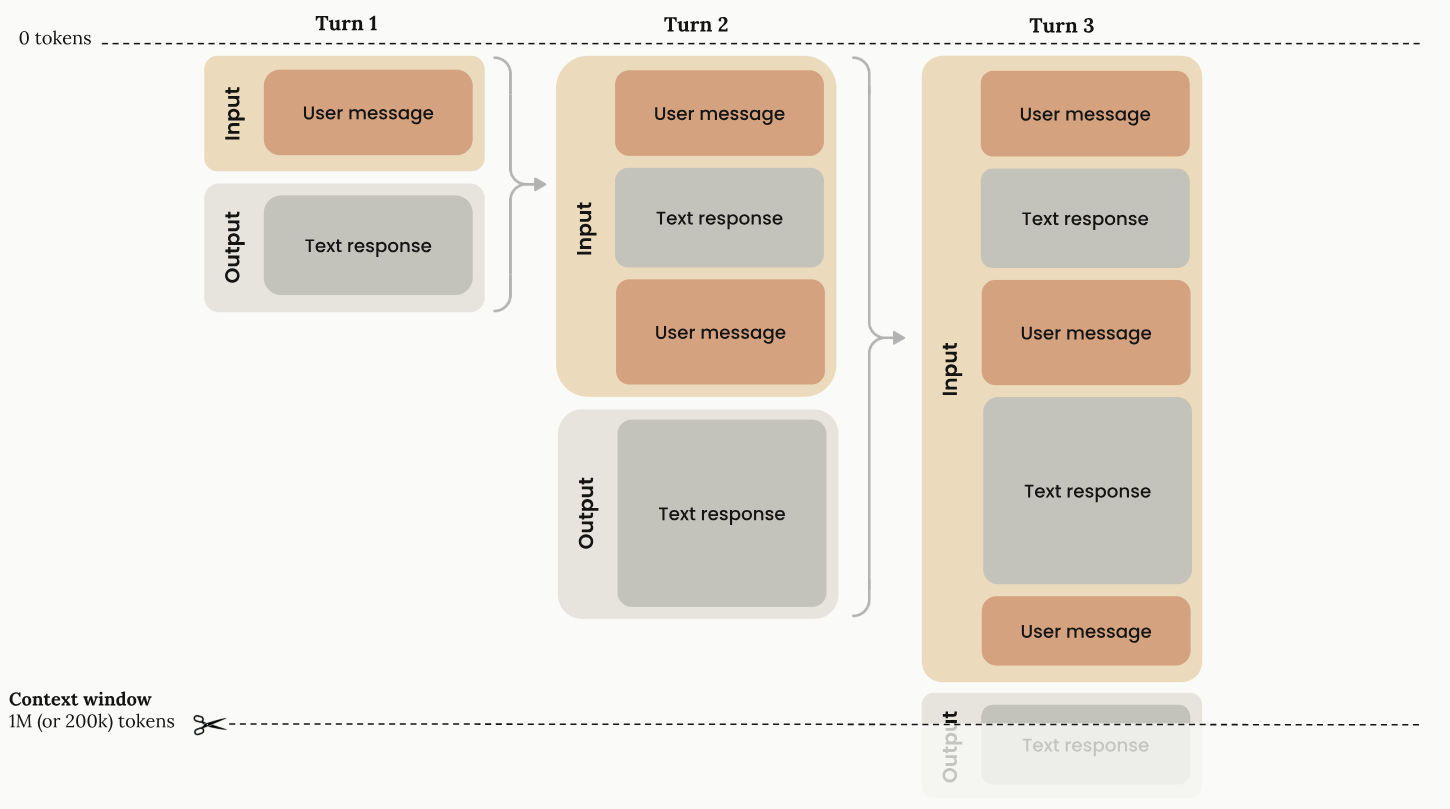
That bundle is the context, and the ceiling on how much the model can read at once is the context window. The ceiling is generous. On some models it is the equivalent of several hundred pages of text, and on most current ones several thousand; the documentation counts in tokens, 200,000 and one million respectively [1]. The context window is finite. A long conversation full of attachments eventually fills it, and the apps cope in different ways. Some quietly drop or summarize the oldest material to make room, which is why an assistant can lose hold of something from early in a marathon session; others simply refuse the next message and ask you to start a new chat [1]. Quality also slips before the hard limit is reached: Anthropic's documentation notes that as context grows, "accuracy and recall degrade", a phenomenon it calls context rot [1]. In a literature-review chat stuffed with whole PDFs or bibliographies, that slippage can surface as hallucinated citations, misattributed findings, or dropped caveats from early in a paper. A very long thread doesn't fail suddenly. It gets gradually worse.
Context lasts only as long as its conversation. Open a new chat and the window starts empty. When a fresh chat does seem to remember something, the old conversation did not follow you into the new window. Something else happened: either a note was quietly taken while you chatted, or the stored record of your past chats was searched and a relevant passage copied in. Either way, what carries over is stored text fetched for the occasion, not a conversation that stayed alive. The vendors call this memory.
Memory: the notes kept between conversations
A memory, in these tools, is a short piece of text saved under your account. If your assistant knows you work on membrane chemistry, a note somewhere says so. The note got there in one of two ways: you asked ("remember that I write in British English"), or the system decided the detail was worth keeping as you chatted. Claude saves memory "as a set of individual topics as you chat" [2]. ChatGPT keeps saved memories (things you told it to remember, plus details it chose to keep) and, with its "Reference chat history" switch on, draws on your past chats as well; on newer accounts, all of this feeds a continually updated memory summary [3].
Memory is stored text. It can be listed on a settings page, edited, and deleted. So how does memory on a server change an answer? By becoming context. Each time the app rebuilds the bundle described above, it copies your stored memories in alongside your message, and the model reads it all as one text. Memory is the filing cabinet; context is the desk. Nothing in the cabinet affects an answer until it has been copied onto the desk.
Put together, everything the model reads before answering comes from four places:
| # | Context source | Who puts it there | Grows as you work? |
| 1 | Standing instructions: the vendor's system prompt, custom instructions or a project brief | The vendor, and you | No; constant every request |
| 2 | The conversation's turns so far | You and the model | Yes |
| 3 | Attachments, pasted text, web and tool results | You, or the tools the assistant uses | Yes |
| 4 | Memory pulled in for this request | The memory system, automatically | No; re-copied in fresh each request |
Rows 2 and 3 empty out when you start a new chat. Row 1 is standing text someone wrote once. Row 4 is memory's doorway into the conversation, refilled each time by a process you don't see working.
Four kinds of memory
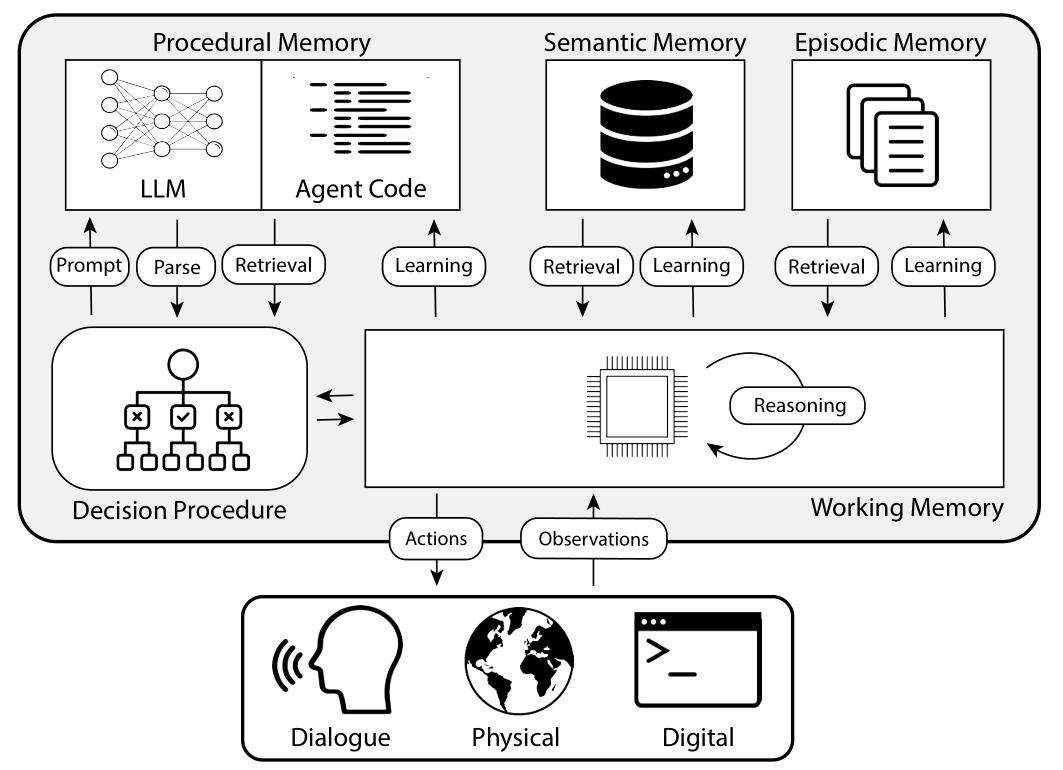
Settings pages mix several kinds of remembering without naming them. Research on AI agents does has a framework called CoALA [4]. If we translate them into product features, the context window is roughly working memory, your accumulated past chats are episodic, the saved notes about you and your work semantic, and standing instructions (custom instructions, a CLAUDE.md file), procedural.
Context and memory share nothing but the text they carry: one is rebuilt from scratch every time you press send and vanishes with its conversation, while the other sits with your account and quietly outlives every chat. See them side by side:
| Context | Memory | |
| What it is | The current conversation: messages, replies, attached files, instructions | Short stored notes about you and your work |
| Where it lives | Nowhere permanent; rebuilt and sent to the model with every message | With your account, on the provider's servers |
| How long it lasts | One conversation | Across chats, sessions and devices, until deleted |
| Your controls | Start a new chat; mind what you paste in | Settings pages; asking it to remember or forget |
Managing what's saved: chat assistants vs coding agents
How you inspect and manage memory depends on which of two families the tool belongs to.
Chat assistants (ChatGPT, Claude) keep memory on the vendor's servers.
- ChatGPT: open Settings → Personalization. Depending on how far the newest design has reached your account, you'll find a memory summary you can read and correct, a list of saved memories, and a switch for each of the two mechanisms [3]. One caveat from OpenAI's own FAQ: the visible summary "will not include everything that ChatGPT remembers based on your chats" [3]. Projects can be fenced off too: set one to project-only memory and what it learns about your thesis stays out of your other chats [5].
- Claude: Settings → Memory lists everything under named topics; open one to read it, use the edit icon to change it, or delete it, with changes applying from your next conversation [2]. Each Project keeps "its own separate memory space", so what Claude learns while you plan a course stays out of your manuscript work [2].
Coding agents (Claude Code, Codex) are a different family: assistants that don't just chat but act, editing files and running commands in your folders. Their memory lives there too, as ordinary files on your own computer.
- Claude Code: reads CLAUDE.md instruction files you write and keeps "auto memory" notes it writes for itself, all plain Markdown you can open, edit or delete; type /memory in a session to browse them [6].
- Codex: OpenAI's coding agent reads an AGENTS.md instruction file from your project folder (plus a personal one under ~/.codex) [7], and has an optional Memories feature, off by default, that saves notes from past sessions to a folder on your machine [8].
Common confusions
Is memory part of the context? Not as a whole. The cabinet stays outside every conversation; notes affect an answer only by being copied onto the desk as it is rebuilt for each reply. Compact collections such as saved memories, the memory summary and a CLAUDE.md file are small enough to be copied in whole every time [3], [6]. Your full chat history is far too large for that: ChatGPT distills it into the continually updated memory summary [3], and Claude searches it when you ask about a past conversation, copying in the passages it finds [2].
If I switch models, does my memory follow? Yes. Memory belongs to your account with a service, not to the model underneath; pick a different model in the same app and the same notes load.
Is it learning from me? Isn't that "training"? No, and no. The model doesn't change as you chat. Whether your conversations may be used to train future models is a separate switch. In ChatGPT the switch is "Improve the model for everyone", under Settings → Data Controls, and on a personal account it is on by default [9]. Claude makes every account choose for itself: "Help Improve our AI models", under Settings → Privacy [10].
I deleted the chat, does it mean what it learned there is gone? Not necessarily. Deleting a conversation does not delete the memories created from it; chats and memory are kept in two separate places [3]. To remove something properly, delete it on the memory page as well. OpenAI notes that a detail may need deleting everywhere it appears: past chats, files, and the memory summary [3].
I turned memory off. Why does a long chat still bring up things from an hour ago? Because that's context, not memory. Turning memory off stops notes crossing between conversations; it doesn't empty the conversation you're in, which keeps accumulating with every message. For a genuinely clean slate, start a new chat.
Four habits worth keeping
A good assistant should know how you like to work without deciding what you conclude. Four habits are enough to keep it that way.
1. Skim what it has saved about you once a term. Use the settings pages above, or just ask in a chat. Then prune. The memory page is a standing description of you that every future answer consults. Stale entries keep steering answers long after they stop being true.
2. Start fresh threads on purpose, and carry over only what matters. When a long chat starts repeating itself or losing hold of earlier material, don't push on: ask it to summarize the thread (decisions made, text agreed, questions still open), check the summary, and paste it into a new chat.
3. Use a temporary or incognito chat when the answer shouldn't depend on you. Every tool has one. In ChatGPT, click "Temporary" at the top right of a new chat and decline the "personalized responses" offer, or it will still read your memories [11]; in Claude, click the ghost icon at the top right, outside any project [12]. Used this way, these chats neither read your memory nor add to it, which makes them the right place for second opinions you want unbiased. They are also the closest thing to a reproducible baseline: on an ordinary account, the same prompt can produce different answers for a colleague, or for you next month, because a different memory profile loads each time.
One caution: a temporary chat is not a privacy control, only a personalization one. What you paste still reaches the provider's servers, and a copy may be kept for safety review (up to 30 days at OpenAI [11]).
4. Write the standing brief yourself. Every tool has a box where you state, in your own words, what it should know in every conversation: your field, your methods, how you like results presented. ChatGPT calls this custom instructions, under Settings → Personalization [13]; in a Claude Project, the button is "Set project instructions" [14]; the coding agents read CLAUDE.md and AGENTS.md [6], [7]. These are just text you wrote, read word for word at the start of every chat. Unlike memory, nothing is inferred, and you always know exactly what it says.
References
All web sources accessed 14 September 2026. "Last updated" dates are those published by the source itself; sources shown without one do not publish a revision date.
[1] Anthropic. Context windows. https://platform.claude.com/docs/en/build-with-claude/context-windows
[2] Anthropic. Use Claude's chat search and memory to build on previous context (last updated 11 September 2026). https://support.claude.com/en/articles/11817273-use-claude-s-chat-search-and-memory-to-build-on-previous-context
[3] OpenAI. Memory FAQ (last updated 15 August 2026). https://help.openai.com/en/articles/8590148-memory-faq
[4] Sumers, T. R., Yao, S., Narasimhan, K., & Griffiths, T. L. (2024). Cognitive architectures for language agents. Transactions on Machine Learning Research. https://doi.org/10.48550/arXiv.2309.02427
[5] OpenAI. Projects in ChatGPT (last updated 17 August 2026). https://help.openai.com/en/articles/10169521-projects-in-chatgpt
[6] Anthropic. How Claude remembers your project (last updated 10 September 2026). https://code.claude.com/docs/en/memory
[7] OpenAI. Custom instructions with AGENTS.md. https://learn.chatgpt.com/docs/agent-configuration/agents-md
[8] OpenAI. Memories. https://learn.chatgpt.com/docs/customization/memories
[9] OpenAI. How your data is used to improve model performance (last updated 11 September 2026). https://help.openai.com/en/articles/5722486-how-your-data-is-used-to-improve-model-performance
[10] Anthropic. How do I change my model improvement privacy settings? (last updated 3 August 2026). https://privacy.claude.com/en/articles/12109829-how-do-i-change-my-model-improvement-privacy-settings
[11] OpenAI. Temporary Chat FAQ (last updated 29 August 2026). https://help.openai.com/en/articles/8914046-temporary-chat-faq
[12] Anthropic. Use incognito chats (last updated 16 July 2026). https://support.claude.com/en/articles/12260368-use-incognito-chats
[13] OpenAI. ChatGPT Custom Instructions (last updated 31 July 2026). https://help.openai.com/en/articles/8096356-chatgpt-custom-instructions
[14] Anthropic. How can I create and manage projects? (last updated 12 September 2026). https://support.claude.com/en/articles/9519177-how-can-i-create-and-manage-projects
